Showing posts with label security. Show all posts

Tuesday, January 17, 2017

More windows 10 FUD


Source: ZDNet

"Windows 7 "does not meet the requirements of modern technology, nor the high security requirements of IT departments", said Markus Nitschke, head of Windows at Microsoft Germany."

You'd think ol' Satjay would have gotten the message with the backlash over the forced upgrade of millions of PC's across the globe with Windows 10's tricky dialog box.

Apparently not...

Today we find the latest salvo against poor old Windows 7 by the proclamation that somehow enterprises are at a serious risk in continuing with Windows 7 ONE MINUTE LONGER!

Please.  The laughable assumption that Windows 10 is the cure for all the ills that plague the enterprise is getting a bit tired.

Consider that even with the recent walkbacks of draconian control of the Windows 10 desktop from IT departments the fact remains that security is not a question of what OS you run.  It's a matter of how good your security policies are and as I've said before the way we treat security will always fail so long as the end user is treated as an adversary.

What about productivity?  What about freedom from nagging popup ads for Office 365 or Cortana getting in the way of a simple search for a hidden app in your start menu?  What about compatibility with current software and most importantly HARDWARE!

If you're an enterprise with a fleet of Kaby Lake desktops maybe Windows 10 is a better fit for you but it's going to have virtually NOTHING to do with how secure your enterprise is.

That takes a good security policy with end-user buy-in or it will fail.


If security was such a concern then Microsoft should have started producing a Linux Distro instead of another flaky, cruft laden OS.  It would have been cheaper and a hell of a lot easier to patch.

If Microsoft still thinks that as they go so goes the world then we'd all be running Linux with a Microsoft logo.  

But that won't happen because everybody knows that paid Linux distributions that nickel and dime you for every app and feature always fail regardless of how good they are.

If this news concerns you, let me provide some salve that's more relevant.  

Security isn't about an OS, it's about your security practices.  Good practice can keep even Windows XP secure in the enterprise...

I've seen it in practice and it has A LOT to do with what you ALLOW in the enterprise.  

Look, you can drive the safest car in the world but if you're determined to drive off a cliff to your death there's nothing that's going to stop that.

Remember where this is coming from.  A company that wants to SELL you an Operating System so that it can SELL you more of it's products.

That's reality.

Tuesday, November 8, 2016

Why Security will always fail


I just made a new video.  It's about rethinking how we approach security so I won't rehash it here.  Suffice it to say that the reason security measures fail is not due to a device or a piece of software.  It fails because we don't value the most critical element of any security policy; the people.

Couple that with the careless and needless collection of private information for purposes that have no justification for having it and you have a recipe for disaster.

Watch below...


Saturday, July 18, 2015

Windws 10 is almost here, Know what you're getting


No long form posts this time just a bit of reality.

The wider web is just waking up to the fact that with the impending launch of Windows 10 things are going to be a bit different.

The most obvious, of course, is that for most people the "upgrade" will be free unless you happen to be an enterprise customer.

What IT pros have known for a couple of months now is that Microsoft's definition of "Free" as it pertains to Windows 10 is less like "Free Beer" and more like "Free vacation" as in those awful timeshare sales pitch weekends.

As an IT pro I'll tolerate a lot of things if nobody's in my wallet but I'm always mindful that somewhere down the line there will be a price exacted.

And so it is with Windows 10...

I'll cut to the quick.  The most important thing to know about Windows 10 is that it's more than a better Windows 8.  It's the cornerstone of a sales platform which is why they can afford to give it away.

Which is also why things like mandatory updates are in your future.  Like it or not if Microsoft wants to change something you have nothing to say about it. 

That's problematic because the Redmond guys don't have the greatest track record with updates.  Any IT pro can probably think of at least half a dozen that ruined their day.

It's also wise to be suspicious of motives when a company hides its true intentions in seemingly innocuous descriptions like " an update to the update. "  (KB3035583)

As such you'd be well advised to treat the new OS like one of those Internet Kiosks you used to find in the airports.  In short, it's an access point but it's not personal. 

So what does all of this really mean? 

Windows 10 is the first real version of Windows to enforce a EULA that's been around since Windows 3.1.  I.E. Wake up kiddies, you don't own the software and for whatever ills Windows 10 may cure you're essentially granting them root access. 

There are changes under the hood that go beyond a fresh interface to include updates, licensing and authentication. Things you may not see but nonetheless should be aware of.

It's simple, Microsoft is interested in building a tightly walled garden much like Apple but without the huge investments in hardware. 

It makes sense.  Why reinvent the wheel when there's so many willing and eager to do it for you?

If you're ok passing everything through Microsoft's sanity filter then this probably isn't a problem for you and 90% of users will gladly give up a little more control for a free copy of a "Windows" OS.

However, If you're at all interested in security and privacy then I'd start interviewing Linux distros and secure offline storage.  I'd also be wary of any project that embraces MS recent change of heart about open source. 

Nothing's free and to be fair they have a right to control their OS but you have a right to be in exclusive control of your data.

I know, it sounds like we're venturing into the realm of conspiracy theory but stop for a moment and think about just how much of your life lies within those bits. 

Of course if you have nothing to hide then you don't have a problem right?


Yes, yes we do...

Friday, March 13, 2015

Are you FREAKed out yet?


So maybe you heard about the latest round of security nightmares that plague what everyone thought was secure web traffic.

A few months back it was a serious security flaw in OpenSSL known as HeartBleed that sent webmasters scrambling.  Then came a left field sucker punch when it was discovered that all an attacker needed to do to compromise your entire server (not just a website) was to insert some code that a BASH prompt would respond to. 

Encryption be damned if you have root access to the server!

Which brings us to the latest security gaffe, otherwise known as a Freak attack...

This one has its roots in the earliest implementations of web security.  Back in the days when the U.S. government was so paranoid about not being able to clandestinely snoop on your encrypted communications that they enforced a ban on strong encryption ( aka: stuff they couldn't break.) It was deemed "export-grade" encryption which was just a fancy name for "weak."

They did it by forcing SSL to downgrade its encryption bit strength when traffic left the U.S. thus allowing easy surveillance of all "suspicious" (meaning all) traffic.

Well, as we know from the Snowden leaks there's not much need to worry about borders anymore.  The U.S. has monitoring bases worldwide now.  Besides, the juicy fruit of of the spy game is gathered from far less hardened sources these days.  Just bug a German chancellor's phone and you've got all the dirt you need on the EU.

But let's get back to the problem at hand. 

There are still remnants of this "backdoor" in SSL and because of it millions of websites are vulnerable to compromise using relatively simple "man in the middle" attacks that utilize the facilities of weak encryption still present in SSL implementations.

The worst part is that the problem exists on both the client (aka: your browser) and server sides.  A compromised client and a compromised server are a marriage made in heaven. 

So what's the solution?  Pretty much the same as always.  Keep abreast of security news and patch, patch, patch!  Which is why there were so many Internet Explorer security patches this week.  Open SSL will have a patch available too.

If you'd like to dig a little deeper the following site will let you test both your browser and your favorite SSL secured websites.


Do it now.

Monday, November 24, 2014

IT on the cheap: Dealing with resource attacks


In a perfect world the Internet would be free, nobody would want to steal your stuff and bad people would be too stupid to do any harm.

Alas, we don't live in such a blissful Utopia and have to deal with the seedy underbelly of a connected world.  As such if you're the guy managing servers and networks you have to be concerned about security.

It doesn't matter how deftly you can crank out pages of powershell commands if your network is under attack.  Worse, if you don't have the budget for the latest IDS (Intrusion Detection System) you're going to have to do some of the heavy lifting.

Thankfully, it's not that hard and while not the ideal scenario you can improve security even if your tools come from Ebay and Best Buy sales.

So take a look at the video below while I walk you through some basic security procedures and deal with an ongoing attack.


Tuesday, April 22, 2014

Why Heartbleed Happened

Originally published on Kupeesh!


So what's up with all this HeartBleed nonsense?

What could possibly be behind the greatest crisis in Internet security since the invention of phishing emails?
How could this possibly happen?  What could possibly jeopardize the security of thousands of websites and secure services we take for granted like Google, Tumblr and even banking sites?

I have an easy answer and it points right back to the Achilles heel of Open Source. 

While proponents will argue the merits of solutions that don't come from commercial sources the one inescapable fact of Open Source software is that it's developed under mob rule.

Therein lies the problem. 

While nobody questions the benefits of Open Source software like cost and ease of customization, proponents tend to gloss over the fact that some projects are better managed than others.

Take the case of OpenSSL.  It's the foundation for thousands of web services like Google, Yahoo and even your bank.   Except that somebody wasn't minding the store and for two years the mechanism that was supposed to secure your communications...didn't.

The flaw was inadvertently discovered by Google's Neel Mehta during a routine security sweep but the flaw had been in existence for 2 years.  Overlooked by one of OpenSSL's core developers, Stephen N. Henson, the vulnerability came as the result of additional but apparently untested new functionality known as a Heartbeat for OpenSSL.  The functionality was supposed to function as little more than an "I'm still here!" beacon to whatever service you're connected to.  

The short of it is this...

The problem comes from not bothering to check that what's sent matches what was requested.  A crafty hacker can take advantage by continually sending heartbeat requests claiming to be of a certain size but not actually being that size.  The server dutifully responds by sending back a response of the claimed size to the client and inadvertently dumping the contents of its memory to fill the otherwise empty space of the response.  The contents of which have been shown to contain user credentials among other compromised information.

It's apparently a simple fix but it's taken two years for anyone to notice. 

Meanwhile, nobody knows how long the bad guys have been aware of the flaw.  How can something like this get by the supposed vigilance of security gurus and major corporations alike? 
I can tell you how, it's endemic, it's cultural and it's arrogance...

It's a misguided belief that oversight of a product is best left to a community regardless of its qualifications to do so.  A community that frequently finds itself more concerned with the technical wizardry of its products than the users who deploy them

It's the same mindset that's kept other Open Source offerings like Linux in the shadows of Windows.  Let's be honest here.  You can only stomach so many unintelligible whitepapers or narcissistic support forum posts before you just give up.  The inmates are indeed running the asylum...

Heartbleed shines a light on the failure of the Open Source community in that it lays open the lack of even the most basic oversight of a critical and widely used service.  It's not so much about the failure of OpenSSL but rather that nobody including its chief stewards noticed the problem for two years.


This is nothing less than a reality check on the entire Open Source community.  One that should be raising questions in anyone that relies on their wares.

Thursday, January 16, 2014

Dealing with the latest Java Security update for your legacy apps

Java's gotten a bad rap lately and with good reason.  It's got so many security holes that it triggered an alert last year from Homeland Security.  Since then we've been getting pretty regular updates from the folks over at Oracle.

If you happen to administer networking equipment, especially Cisco branded devices, you've no doubt run into issues that come with Java updates.  If you have to manage different generations of networking equipment, for example, there's not doubt you have to maintain multiple versions of Java to manage them.

The latest Java security update for Java, 1.7.0_51, has finally made good on a threat.  It's activated functionality that effectively blocks any Java applet that doesn't have the "security manifest" parameters enabled.

That can leave you dead in the water.  Except, if you know how to work around it.  The video below shows you how to set an exclusion for trusted connections and applets.

Remember, this is only for connections and applets that you have complete trust in.


Monday, December 30, 2013

Breaching your Security Britches

I'm still basking in the glow of the holiday season as I write this.  It's the day before New Year's eve and things are pretty quiet in the IT world.  On the IT jobs front there's a few listings all searching for the "impossible candidate" but most of them are just duplicates from agencies trying in vain to snap up those last few contracts before the Calendar ages another year.

IT budgets are still tight and salaries still aren't where they should be.  Of course if anything's increased,  it's the strain on IT staff.  It's a perfect recipe for disaster as expectations of the impossible become the norm. 

Case in point, the botched rollout of the Obamacare website.  Political motivations aside I knew it would fail.  Not because it's a bad idea but because like many corporate IT projects, nobody bothered to ask the IT guys.  It's a government venture after all, rife with bureaucratic red tape and too many layers of management.  None of which have any  clue about managing a successful IT project. 

To a public convinced that YouTube "just works" and the Internet requires nothing more than a WiFi connection  there's no further deliberation necessary.  The chant goes, "I want this, make it happen next week!"

It's a sad but common state of affairs.  IT departments are far too often under the purview of senior management with a ready, fire, aim philosophy and bad information.

All end users know is that they want more..."something" and increasingly, IT is in no position to say no.  There's even an accepted accreditation, the ITIL, that embraces the premise.  Give them what they want and to hell with the consequences even if you have to undermine the infrastructure to do it.

I can guarantee this is the root cause of most security breaches like those we saw with Target this year and Barnes and Noble in 2012.  They all stem from somebody giving in.  I can just see the exchange now...

IT Guy: You know, we really haven't updated the servers in 5 years and I'm worried about securing our customer data. BigBoxCo just got hacked last week and they've got the same stuff we do.
Accounting Supervisor (his boss): What? did the server's stop working? I got my email today and I was able to get to Ebay...
IT Guy:  No no, they're working fine but we're doing a lot of transactions and there's known vulnerabilities in our encryption algorithms.  We need to address this.
Accounting Supervisor (his boss):  Ok, but the servers are working right?
IT Guy: Yeah but that's not the point...
Accounting Supervisor (his boss): Well, do what you can with that, maybe you can fix it on your lunch break.  Just don't spend any money and for god's sake don't take down the servers for more than 10 minutes. Customers hate that!
IT Guy: Uh, ok but we don't have any failover so that's kind of impossible...
Accounting Supervisor (his boss): Oh, and lets relax those password requirements, I don't like changing it all the time and like to use my dog's name instead.  Maybe you can do that with the customer sites as well.
IT Guy: <sigh> Yeah....
I've had these conversations and they're more common than you think.  So guess who gets the blame when bad things happen. 

You can't have it both ways.  In our example above, the IT guy is right but that has to be balanced against the so-called "business case." 

Problem is the "business case" is often one-sided and incomplete.  That leaves plenty of opportunity for disaster.  It shows up in unexpected service outages, poor performance and workarounds that leave the door wide open for social engineering.

And that's the rub...

Look deep into the root cause of these high profile security breaches and you find out that somebody cut a corner.  It's human nature to want to make others happy.  So when faced with a painful and unnecessarily complex procedure that violates that desire, social engineering takes over.

"Ok, we'll relax the password policy for you"

 or

"Well we don't know much about how secure their servers are but this hosting provider is cheaper.  Oh yeah and they host porn sites so they must know what they're doing with all that traffic!"

Users let down their guard because the bad guys know your process and take advantage of its flaws.  IT guys let down their guard because they don't have the power to say no.  It's the same failing just expressed in different contexts. 

We have IT security vulnerabilities precisely because the way we interact with technology doesn't match up with our nature.  Human nature says to take the path of least resistance and 23 character passwords with mixed case, numbers and special symbols don't cut it.  Yeah, I know there's LastPass but that's a band-aid to the core problem.

So how do we secure anything in the face of all this opposition?

 It's simple, we stop thinking about "enforcing" anything.  Nobody likes to be under anyone's "enforcement."  Instead we start taking into account how people use technology instead of getting in the way of it with some clunky authentication mechanism.

While we're at it, why are we still using payment methods directly connected to bank and credit accounts?  Why aren't pre-paid instruments more popular?  I know the reason, they're a pain to use and like our 23 character password, nobody likes that much "resistance."

You now, it wasn't so long ago you could go to a store and buy things on credit. 
Not Visa or American Express credit, I'm talking about store credit.  You paid your bill every month directly to the store.  No personal information or bank accounts involved.  You just plopped down your money and you were done.

Of course we live in a world where we're forced to live beyond our means which has parlayed itself into ever increased complexity.  Banks and credit card companies have made millions based on the fact that nobody in business is willing to handle their own credit accounts if they even bother to have them.

So there's another feat of social engineering.  Another layer of abstraction between what we're trying to accomplish and what we ultimately DO accomplish. 

Somehow, we've managed to accept the ridiculous as a reasonable premise. 

That's exactly why nothing will change and security will ultimately fail simply because it's based on building a mountain of complexity where a bit of positive social engineering would do far better.

Of course there's too much money in that mountain of nonsense we keep adding to.  Entire industries owe their existence to it and nothing will change because of it.

So you have two choices, live like a hermit and pay cash for everything or accept that till somebody gets a clue there is no security or privacy.

If you need an example, try this...

Imagine you and your 5 year old daughter are at a restaurant for lunch.  A strange man approaches her and offers her candy.  Completely ignoring all your admonitions to the contrary she reaches for it.
What do you do?

It's likely you immediately intervene.  Depending on the threat it can range from tackling the guy to a dirty look.  Either way you took control of your own security concerns and it was a pretty simple process.  Nothing was going to happen without your direct involvement.

Put that in the context of how security works now, however, and you'd spend 10 minutes trying to remember your mother's maiden name and date of birth before you lifted a finger. 

Yeah, it's really that bad and exactly why security concerns in IT or otherwise need to be reframed.  All of these heaped on layers of band-aids and bailing wire are all for naught.  In the end we're not really securing anything.  How can we? We're never allowed to participate in the process. 

It's like the old joke where the man goes to the doctor and says, "Doc, it hurts when I do this!" and the only advice from the doctor is to say, " Then don't do that..." 

The more we remove human nature from the equation, the less meaning security has.

Tuesday, April 23, 2013

Bits in the wires: Homeplug


By now you've probably been exposed to at least some form of connectivity that doesn't involve a traditional
wired connection.  Most likely it's Wi-Fi but what happens when you just can't get a good signal?

Maybe you've got your game room in a converted basement or want to have internet access in your shiny metal RV garage.  Running wires isn't always a viable option especially in older construction or where distance exceeds the specification for maximum cable length.  It's still 328 feet for Ethernet by the way.

Wireless networking options can be very finicky.  For one thing if you're trying to push a signal below ground level (such as our basement example) you'll soon find out the limits of an annoying little thing called wave propagation.  Nothing kills a wireless signal faster than an obstruction and good old terra firma (the ground) is one heck of an obstruction. 

Another kind of obstruction isn't as obvious.  It's called the "Faraday effect" and it can squelch a wireless signal simply because there are too many conductive surfaces that can absorb it.  Your big metal RV garage can act like a "Faraday cage" and diffuse a wireless signal before it ever gets near your wireless device.

So if network cabling and wireless aren't an option are you stuck? 

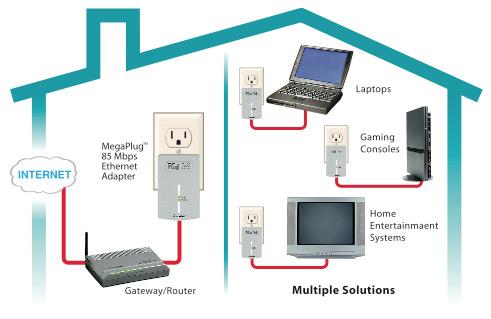
Not necessarily.  There's a third option that's become more popular and it uses wires but not the ones you typically associate with computers.  It's called Powerline networking or "Homeplug" and you've likely already guessed from the name that it has something to do with power lines. 

Powerline networking in a nutshell simply uses your home's electrical wires as a transmission medium to connect to your other network devices.  It's based on an IEEE standard just like Wi-Fi called IEEE 1901.
The most recent incarnation of the standard is called Homeplug AV2 and it promises speeds up to 500Mbps with some companies claiming to top out at Gigabit speeds.  Of course those are theoretical maximums.  A good rule of thumb is to not expect better than 1/3 of the rated speed.

Powerline networking is a great option when others fail you but it has it too has its drawbacks.  For one thing the signal can be affected by the way your house is wired or the kinds of devices you have plugged into your other wall outlets or even the outlets themselves.   

You also have to plug the adapter directly into your wall outlet so no surge suppressors or UPS's allowed.   Those devices can kill the signal. 

Don't worry about electrical surges damaging them though, most vendors have integrated power protection into the Powerline adapters.  Some models even come with a pass-through so you don't have to give up an outlet.   Just don't plug your vacuum cleaner into it unless you want to lose signal.  Powerline network connections are sensitive to transformers and that 12 Amp Dyson is a big one.

Generally you purchase Powerline networking adapters in pairs since it takes a minimum of 2 to get going.  Installation couldn't be easier as you generally just plug the adapters into a wall outlet, plug in an Ethernet cable between your networked device and the adapter and wait for your pair of adapters to sync up.  The only other thing to consider is which device you want to be the "coordinator".  A coordinator is usually the first device and will control the communication between all other powerline adapters. 


Security is simple as well.  By default, today's Powerline networking equipment is already protected with 128 bit AES encryption.  Generally that's enough unless you have power outlets outside your home or live in an apartment.  The first concern is obvious the second may not be. 

Since Powerline networking has no authentication mechanisms outside of the network name, someone who could see your Powerline adapters could just plug in and connect to your private network.  This can happen if you happen to share a fuse box with a neighbor. 

Don't be too concerned about broadcasting to your entire neighborhood though, the signal does have a limited range and likely won't make it out of the confines of your home.  In some cases it may not make it past a few rooms if you happen to have GFCI outlets on the circuit.  The signal is very sensitive to power protection circuits which is why you can't plug adapters into UPS's or surge suppressors.

If that's not enough protection for you, however.  There's one more way to secure the Powerline network.  Simply change the Powerline Network name.  That's usually accomplished by pressing a button on one of the networking devices for a period of time, waiting for status lights to flash a certain sequence then go to the other devices and repeat the procedure till the devices all sync up. 

Similar to a wireless network with a WPA passphrase securing its connections a Homeplug network is virtually impossible to hack into without more effort than your slacker neighbor has the ability or the patience for.  Think of a Homeplug network name like a combination of a WPA passphrase and an SSID on a wireless network.


Some adapters like ZyXel even come with configuration software so you can set your own network name instead of relying on an auto generated one from the previous procedure.  That's usually enough to keep prying eyes out of your Powerline network but if you're really paranoid you can also set what's known as the DAK or Device Access password.  The DAK is a 16 Letter key usually printed on the bottom of the actual device.   

That can prevent a rogue Powerline adapter from changing settings on remote adapters by preventing  changes to your Powerline adapters from a remote location unless that DAK password is entered.  In effect, it prevents someone from hijacking your powerline network.  The down side is you have to manually enter the information into your configuration  software which can be tedious if you have a lot of adapters.  

So what else do you have to worry about with Powerline Networking?


Well, much like wireless devices, compatibility can be an issue.  For one thing, even though there's one standard for Homeplug not all versions are compatible.  For example, new devices using the Homeplug AV2 standard will not talk to older Homeplug 1.0 devices. 

Earlier devices were slower and implemented security in a way that won't allow them to work with newer devices.  They can, however, be used in parallel with newer devices, the two types just won't see each other.
Also, some devices that are configured to be the "coordinator" will refuse to connect to other devices that are capable of assuming that role.  I actually have a pair of Zyxel and Cisco Homeplug AV adapters and only one of the two Cisco units will talk to the Zyxel units. 

Powerline is generally a last ditch option to get connectivity where other methods fail so I wouldn't reccommend basing an entire network topology on it.  The standard can support up to 64 individual adapters but 16 is the practical maximum for good performance. 

I've personally used Homeplug adapters for about 5 years now and I've been generally happy.   That said, I've seen my theoretical 200Mbit speeds drop to 5Mbits for no apparent reason.  Luckily, that doesn't happen too often.

It's definitely been a more reliable option than wireless especially when streaming Internet video.  Wireless signals tend to be more erratic than Powerline networks even with the advent of 802.11 N and multipath or MIMO.  Peak wireless transfer speeds do tend to be higher, however.

Some have reported reliability issues with Powerline adapters from Cisco and Netgear and it can be difficult to get even a matched pair to renegotiate security between two devices.  I've never had an issue with my Zyxel PL401A V3's but I did with My Cisco PL300's.

There is one other option that's similar to Powerline networking that uses coaxial cabling called MoCA
(Multimedia over Coax Alliance) which is promoted by cable companies (of course) and serves as the basis for many of those "whole home DVR" offerings.

Admittedly,  I've had limited experience with MoCA devices but found them to be generally more costly and far less reliable than Homeplug.

The MoCA standard is currently in version 2.1 and promises 800Mbps to 1Gbps of bandwidth but factors such as the type of Coax cable, number of splitters and quality of terminations can have a serious effect on performance.  

This latest incarnation of the standard tries to address some of these issues by trying to prioritize sensitive traffic like HD video streams using what's called PQOS or Parameterized Quality of Service.  PQOS is much like the Quality of Service found in modern network switching and routing equipment that ensures certain types of data are classified and given priority on the wire.

AT this point Powerline Networking is the more mature standard and is more focused on traditional data connectivity than streaming video and multimedia traffic like MoCA. 
Although MoCA isn't as well known as Homeplug it's worth mentioning here since it's likely your home DVR's are communicating via it's mechanisms. 

Anyway, that's it for my discussion of alternate networking options.  Check out the links below for more information.

Tuesday, March 26, 2013

Wireless Networks (Nostalgia Version)

The following is another article from my old website.  This one's about wireless networking from 2007.  The information is a little dated but for the most part is still valid.  Hard to believe 802.11 is still so important to our mobile connectivity.  Most IPADs are worthless about it.

Enjoy!


Wireless Networking


Ubiquitous is a favorite description in many articles on the subject and it is, almost.  Wireless connectivity has rapidly become a standard feature of many of our electronic devices.  Cellular phones have offered some form of internet access in addition to voice functionality for years, wireless connectivity in your laptop is a given and even waiting for a table in a restaurant can expose you to wireless devices in the form of those vibrating coasters they hand you that alert you when your table is ready.  There are many ways to interact with your world without wires.

It’s likely the form of wireless access you’re most familiar with is Wi-Fi.  Wi-Fi stands for Wireless Fidelity and is comprised of a set of standards for wireless equipment that is meant to serve small private areas.  If you’ve ever been in a coffee shop that offered a “wireless hotspot” this form of wireless connectivity is likely what was offered.

It may be confusing to think of a private network operating in a public space but the distinction has more to do with the physical range of coverage available.  Many Wi-Fi devices have a limited range of less than 500 feet from the wireless access point.

Wireless networks can be designed in 3 basic configurations.  The most common is referred to as an “Infrastructure” or Single point of Access and it utilizes a centrally located “access point” that all wireless clients connect to for wireless services.  The second type called an “Ad-Hoc” network is generally found in networks that don’t need a centralized access point.  Simple file sharing between two laptops with wireless cards or sharing an internet connection with an internet connected computer with a wireless adapter would fall into this category.  The third type is commonly found in business locations with multiple access points.

This configuration is known as a “Multiple Access point” or floating access point configuration.  This configuration is much like the “Infrastructure” configuration but as the name implies employs multiple access points that can “hand off” a wireless client from one access point coverage area to another as the wireless client moves.  This is similar to the process of a cell phone call made in a moving vehicle.  As the phone moves from a weaker signal area into a stronger signal area the stronger “tower” (our access point in WI-Fi context) picks up the signal and allows the communication to continue uninterrupted.

A wireless access point is a device that provides a kind of bridge for wireless connected Wi-Fi devices to connect to wired networks.  In this way many wireless client devices can access wired network devices without the need to be cabled to them.  Wireless client devices use wireless adapters that are matched to the type of wireless access points they’re meant to connect to.  The reason that range is so limited has to do with the radio frequencies that Wi-Fi operates in.  Generally Wi-Fi operates in the 2.4Ghz or 5Ghz radio frequency range.
           
These are very high radio frequency ranges which can offer a relatively high speed and data carrying capability (or bandwidth) but cannot traverse long distances.  A basic rule of radio frequencies is that with higher frequency you have decreased distance due to the need for more power to drive the radio signal further distances.  This is much akin to why low frequency, low power AM radio can be heard 100’s of miles from its point of broadcast but FM radio using much higher amounts of power can only traverse around 10% of that distance.  Generally speaking to make WI-FI devices traverse farther distances you’d either have to increase the power of the radio transmitter to an impractical level or create a very large, cumbersome antenna.

The Standards


There are currently three viable wireless options available for WI-Fi.  All of these are a variation on the IEEE 802.11 specification and vary in speed and/or frequency range used.  Connection speeds are expressed in Megabits or Mbits and equate to the number per million bits of data that can be transmitted in one second.  This should not be confused with Megabytes which is commonly used to specify storage capacity for devices such as hard disks.  A simple way to remember the difference between Megabits and Megabytes is to keep in mind that one byte is comprised of 8 bits.  That means that any calculation showing Megabits will always be 1/8th the quantity of the same number of Megabytes.  A Megabit is always going to be a fraction of a Megabyte.  When we are working with wireless devices using the 802.11 standard we will always be talking about Megabits for the foreseeable future.

Up front we should mention that wireless speeds are a theoretical maximum under ideal conditions.  Wireless connection quality can vary due to distance, obstructions in the line of sight to the wireless signal source and interference from other wireless devices such as wireless phones.  Most newer wireless 802.11 devices will automatically adjust their speed downward when signal quality degrades in order to maintain a quality signal between wireless devices.  For example a wireless access point 200 feet away from a wireless client in an open room will likely provide full signal strength at maximum speeds.  Those same devices put the same distance apart but in separate rooms will suffer a loss of signal strength and possibly connection speed.  Many factors go into the strength of a Wi-Fi signal but the most critical is to locate your wireless sources (such as access points) in an area that is high and relatively free of obstructions to client locations.  Suffice it to say, putting a Wireless Access point under your desk is probably not the best location for optimal coverage.

The most common and lowest cost Wi-FI option due to it’s length of time on the market is 802.11B.
802.11B offers up to 11Mbits (Mb=Megabits) of speed and operates in the 2.4Ghz frequency range.  This was the first commercially viable wireless standard and is still very popular for economical wireless networking.  It’s effective range is roughly 300 feet from the access point or wireless peer device.
802.11B devices are currently the most universal of all the devices within the three popular standards because all other standards allow for interoperation with it.

Next up in the Standards is 802.11G.  802.11G offers up to 54Mbits of speed and also operates in the 2.4Ghz frequency range.  It is the newer of the more popular standards available.  Along with speed, 802.11G introduced enhanced security features over 802.11B.  As mentioned earlier most “G” devices can communicate with “B” devices but there can be a performance penalty when operating with them.  The reason is that any “G” device will drop its speed back to “B” levels (11Mbits) in order to allow communication.  This can cause other connected “G” devices to drop their speed back as well thus eliminating much of the speed benefit of a “G” device.  Some manufacturers have devised methods to minimize this effect but as a rule it’s best to not mix “B” and “G” devices if possible.

One drawback to “B” and “G” devices concerns interference issues.  The 2.4Ghz frequency range is commonly used by devices other than wireless network equipment.  These devices can suffer interference issues that can effectively decrease their performance.  Consideration should be given to locating these devices away from 2.4Ghz wireless phones and microwaves.

The last standard is not as popular due to issues with range and relatively high cost.  This standard is known as 802.11A and is also a 54Mbit connection that operates in the 5Ghz range.  This standard was actually developed at the same time as 802.11B to deal with the speed limitations and interference issues present with 802.11B’s 2.4Ghz range.  802.11A is hindered by a very short range of roughly 100 feet on average but tends to suffer less of the speed drop-off that can occur on 802.11B networks.  Because of its different operating frequency range 802.11A devices do not interoperate with 802.11B or 802.11G devices.  Interoperability is most likely the reason for the lesser popularity of the 802.11A standard.  802.11A equipment is found primarily in corporate environments where speed and reduced interference is more of a factor than distance.

When purchasing wireless networking equipment it’s best not to mix devices of different standards.  Often for a small network it’s advisable to stay with the same manufacturer as well.  Many manufacturers have optimized their product offerings to offer enhanced speed, security and administrative features when products are within the same family.  Match components as closely as availability and budget allow.
Security

Another consideration with wireless networks concerns the security of the wireless conversation between host and client.  To some this may be a surprise but security is one of the most important aspects of wireless networking.  Why? Simply put, when you access your wired resources via a wireless network you are connecting via a medium of air.  A wired network in the typical small office has limited access to outside world.  Generally access from the internet or other public network is controlled via routing and/or firewall devices that employ complex mechanisms to control access.  Access from clients on the wired network can be controlled by addressing schemes, passwords and enhanced security settings set at the network server level.

Wireless connectivity by default has no security mechanisms enabled.  Out of the box a wireless access point and wireless card will successfully connect to each other and create a connection “over the air” that can be easily compromised.  Perhaps you’ve heard the term “war driver” used when discussing wireless networking.  This term refers to a malicious or opportunistic individual that attempts to make unauthorized use of wireless and by extension wired network resources.  Most home computer networks are relatively unsecured and don’t employ security measures mostly for reasons of convenience.  Many small offices aren’t configured any better and the introduction of a wireless access point provides easy access to sensitive data by unauthorized individuals.

The reason wireless equipment is delivered in this configuration is to ensure ease of installation for end users.  Security settings can be difficult to implement and misconfiguration can cause issues with connectivity to wireless clients.  Since wireless manufacturers are more concerned with selling product than wireless security it’s no surprise that they keep configurations simple.

Wireless security settings can be complex and mobile users often find themselves reconfiguring them to match the settings of the wireless resource they’re attaching to.

There are three basic types of wireless security authentication mechanisms in common use today.  These are WEP or Wireless Encryption Protocol, WPA or Wi-Fi Protected Access and WPA-PSK which is the same as WPA but primarily meant for home and small office use.  Along with these mechanisms another setting commonly found in the settings dialogs of wireless devices concern whether network access is negotiated via “Open” or “shared key”.

A network that authenticates as “open” does not attempt to encrypt data between the wireless client and the wireless host during connection negotiations.  A shared key will initiate a process of sending encrypted data during connection negotiations.  The natural security choice would seem to be to use the shared key option, however it’s been shown that the negotiation process in this method is imperfect and at one point sends unencrypted data over the link during the negotiation.  This could allow an eavesdropping malicious user to gather enough information to deduce the key by comparing the unencrypted data to the encrypted data.  Therefore it’s generally recommended to run an “Open” system since no negotiation process is available to the malicious user to eavesdrop on.

WEP


Wireless Encryption Protocol was one of the first attempts to secure wireless networks.  It uses a 40, 64, 128 bit encryption “key” to validate wireless clients to wireless access hosts.  This method works by configuring a matching string of characters (how many is determined by the size of the key used) on both the wireless client and wireless hosting device.  The key is only known to the users and connectivity cannot be established from client to server without the proper entry of this key in the wireless settings of both devices.
This was an effective method of security but had one basic flaw.  The key was manually set and did not change until the configuration was manually changed on both the host and the clients.  It was possible for a malicious “war-driver” to conduct a “brute force” attack against the wireless access point.  The malicious user could run a program that would continually send keys to the device until it finally found one that was accepted thus allowing access to the wireless network.

WPA & WPA2


Wi-Fi Protected access is the successor to WEP.  WPA has two flavors; WPA-PSK which is meant for home and SOHO users.  It uses a shared passphrase and periodically changes the encryption key automatically.  The second type of WPA is WPA-802.1x which is generally used in larger enterprises utilizing separate RADIUS (a special type of password server) and an encryption protocol called EAP (Extensible authentication protocol)
There’s also a newer standard called WPA2 that uses a different type of encryption algorithm during the periodic encryption key change or rekeying process.  WPA uses a rekeying process known as TKIP (Temporal Key Integrity Protocol).  WPA2 uses a rekeying process known as AES (Advanced Encryption Standard).

Other options


There are other options available to secure wireless networks and standards continue to evolve to improve security.  One interesting option we’ve deployed for a client involves a device known as a Wireless Authentication Server.  We have a client that wanted to offer free wireless internet access to their guests but didn’t want to sacrifice the security of their wired business network.  They also wanted to enable their guests to have easy access to the new amenity but still have control over the connection.

The solution was a stand-alone hardware device (the Wireless Authentication Server) that connected directly to the client’s internet connection independent of any internal business network connections.  We connected the Wireless Authentication Server to a dedicated network switch with Power over Ethernet capability (POE).  We used the (POE) feature to power two wireless access points also connected to the switch.  The POE function allowed us more freedom to position the access points since we didn’t need to stay near power outlets when mounting them.


The wireless security features of the Access points were disabled to simplify client connectivity.  This was done because while there are standards for wireless security not all wireless manufacturers implement these features in the same way.  This could be confusing to less experienced users and even cause connection failures.  Since the two major requirements were security and ease of access we had to make the system user friendly as well as secure.  While disabling security features on an access point is generally not good security practice for this project there was no compromise in security.  This was because we were able to transfer the security functions to the Wireless Authentication Server.  The Wireless Authentication Server encrypts all authentication and controls access to the resource via its own internal authentication mechanisms including password and username combinations.  The wireless access points were positioned to provide maximum signal coverage in the desired areas without bleeding coverage into areas that didn’t require it.

We should also mention the many wireless broadband options available to mobile users.  These services differ in that they are meant to provide internet access to one client via the service provider’s private network.  Configuration and security features are controlled by the service provider usually utilizing customized software installed on the client device.

Wireless broadband, as it’s called, has improved in the past few years.  Not so long ago slow data rates and high cost made these services impractical.  Now with mature technology and better wireless signal coverage we are now seeing more reasonable pricing and data rates rivaling High speed wired connections.  Services such as Sprint’s mobile broadband service or AT&T and Verizon’s 3G networks all use similar wireless technology.  These services require specialized wireless cards that have no interoperability with Wi-Fi networks.  Their use is more point to point in nature and not meant to be a peer network as Wi-Fi is.  Think of such services as being more akin to your DSL or Cable modem than your network card that connects to your home network.

The Future (as in now, ha ha)


Wireless access continues to evolve and the next standard on the horizon is Wireless N.  Wireless N promises speeds up to 108Mbits using the same 2.4Ghz frequency band as 802.11 B and G.  Enhanced security features, better speeds and longer range are the major improvements with the latest iteration of the standard. One of the ways “N” devices improve speed is by using additional antennas.  The additional antennas are there because “N” devices transmit Multiple signals in and out of these devices on multiple channels also known as MIMO.  In addition each channel is able to carry more data than previous “A, B or G” devices.  There are devices utilizing this technology now but the standard is still not official making the purchase of potentially risky.  There is a risk of a “pre-N” device not being compatible with devices produced after the standard is official.  Our recommendation is to wait for the standard to become official for business purposes.  If you wish to try out the technology at home it’s a good idea to stay with the same vendor to ensure compatibility.

Hopefully you have a better idea about Wi-Fi and some of the options available to you.  Wireless standards are always evolving and the next few years will likely see speeds approaching the fastest wired connections.


Monday, October 31, 2011

Are Macs invading the enterprise?


"Better watch out, better not cry Macs are gonna make your IT guy sigh..."
Set to "Santa Claus is coming to town"

Usually I ignore the daily LinkedIn updates in my inbox informing me of the goings on of people who may know people that were once in the same state as a guy I sat next to in Burger King 1o years ago.  Wow, that whole 6 degrees of separation thing must be true...


So one of those strangers in my inbox was recommending a link to a story on Business Insider talking about the increase of Macs in the workplace.  The cliff notes version goes something like; Rich professional people are really creative and like Macs more than PC's and because of it they want to use them at work. 


I've actually seen evidence of this in action at my last employer.  The entire organization was run on PC platforms but there were a few Macs floating around as well as some Mac "servers" Which were glorified 1U server chassis' running Snow Leopard.  AKA, not a server.


True to the assertion of the article, our Mac users were in the executive suites and generally didn't want to do more than get their email and browse the web.  Anything else required running terminal server sessions a la' Parallels just to edit a word document. 


I remember on my first day I got called to the office of the regional manager whose only complaint was that the terminal server session and desktop wasn't like his Mac desktop.  Great first impression I made that day.


By the time I came along the Mac users already accepted the fact that we could never be a pure Mac shop mostly because everyone else had to do lots of boring uncreative stuff that didn't work on Macs.


I've written other articles about Macs in business environment so I won't belabor the point here.   Suffice it to say that as long as Apple treats all their products  as consumer devices (even if it says "pro" on it) with no regard for business  process, there will always be resistance by IT departments.  In this case, resistance is not futile because the bottom line is that Macs don't play well with most enterprise networks and applications.


This isn't meant to be derisive it's a simple statement of fact.  Remember that the sandbox that is Apple rejects conformity.  99% of enterprise networks are running non-Apple hardware and operating systems.  They conform to the evil IBM model because they have to, there isn't a good alternative.  Linux is still somewhere around the level of Windows 98 for the desktop and Macs have to use Microsoft office because they still don't have a good productivity suite. 


If you live in a sandbox, sometimes you gotta order out...


I'm sure the Mac enthusiast is thinking, "Well, the enterprise needs to change then"  Yes, maybe it does but right now it hasn't and honestly it can't.  As long as the bulk of corporate America doesn't produce anything more creative than a suggestive photo at the Christmas party nothing will change.


Until corporate America finally decides to drop its 19th century labor model and realize that people don't have to be under your nose to be productive, nothing can change.  Journalists, consultants and others not dependent on a corporate cubicle have figured out how to excel without the chains of corporate IT conformity.


That works out fine for them but if you go to work in a cubicle decorated with pictures of places you'd rather be don't expect the revolution any time soon. 


Mac's by their very design are non-conformist.  From the ambivalence of the file system organization to its lack of support for common enterprise applications Macs are meant to accommodate the user not vice versa.  That's the way Steve Jobs wanted it so don't expect it to change.


With the advent of cloud services, Google docs and online meeting options , it's possible that someday we may not have to waste years of our lives in pointless commutes to some dreary office building.  This is where Macs can become a viable option.  To make a Mac work for business you have to get it out of the office and give it an Icloud account. 


Apple is all about creativity and connectivity.  Everything from the sandbox is meant to work with everything else with an Apple logo.  Online experiences are supposed to be ABOUT the content not the process of getting TO the content. 


Enterprise IT doesn't work that way.  Enterprise IT has to control all the channels if for no other reason than to protect its information assets.  It's not about WANTING to control everything it's about HAVING to.  IT departments don't have a choice in the matter.  If given the choice without repercussion most IT guys would let the free for all happen if for no other reason than to be hated a little less. 


But we all know the corporate network would be in flames in 20 minutes.  It's human nature to be freeform which flies in the face of any IT organization trying to secure and provide reliable resources. 


So it is, so shall it be.


Macs are to Enterprise as Smartphone  is to Blackberry. 


Similar function, different methodology. 


There's nothing wrong with using a Mac if it fits your style of work but it's very design is guided by the premise to NOT be like a PC.  That's why they never seem to fit well into enterprise IT architectures. 


I'm not anti-Apple, I just know it doesn't work well in the prevailing IT construct. 


If the world decides to throw away the construct and do it Apples way, however, then it's conceivable that Apple could become a catalyst for finally abandoning an outdated work methodology that says work only happens in an office.

Article first published as Are Macs Invading the Enterprise? on Technorati.